Thesis
As part of my thesis, I researched into using Generative AI and Python to create a full, end-to-end phishing simulation tool. The results were… interesting.
This tool would perform the reconnaissance phase, enumerating a given organisation’s websites to harvest e-mail addresses, allow the user to select their “targets” manually, or automatically and then for each user, generate an individual phishing email. The full thesis can be found on ResearchGate, in this entry I’ll explain how to use the tool and how it all worked.
Usage
The full help menu could do with tidying up, a majority of these are options to help tune the scan.
./SEIBR/simulation_tool/main.py --help
usage: main.py [-h] [--full-simulation] [--dry-run] [--display-org-details] [--new-simulation-without-scan] [--resume-simulation] [--delete-simulations] [--delete-organisation] [--delete-simulation]
               --organisation ORGANISATION --organisation-url ORGANISATION_URL [--overwrite] [--probe-tlds] [--total-crawl-count N] [--domain-crawl-count N] [--crawl-depth N] [--random-participants]
               [--participant-count N] [--simulation-id ID] [--participants-file FILE] [--send-emails] [--host-website] [--simulation-length N] [--reset-simulation-participant-status] [--scan-only]
               [--show-shared-mailbox-users] [--generate-report] [--reset-db] [--organisation-report] [--log-level LEVEL] [--debug] [--llm-model MODEL]


        />
(======>||--==========|SEIBR|=========>
        \>

Phishing Simulation Tool

options:
  -h, --help            show this help message and exit

Flows:
  --full-simulation     Execute the full simulation flow, including crawling, participant selection, email generation, and sending
  --dry-run             Generate all artefacts locally but do not send emails or upload anything
  --display-org-details
                        Display detailed information about the target organisation after scanning
  --new-simulation-without-scan
                        Start a new simulation, without performing a website scan (useful if you just want to test the email generation and sending functionality using existing data in the database)
  --resume-simulation   Resume the most recent simulation instead of starting a new one
  --delete-simulations  Delete all simulations from the database (use with caution!)
  --delete-organisation
                        Delete the target organisation and all related data from the database (use with caution!)
  --delete-simulation   Delete a specific simulation by ID (use with caution!)

Target:
  --organisation ORGANISATION
                        Name of the organisation
  --organisation-url ORGANISATION_URL
                        A known URL of the organisation, used as the starting URL for crawling
  --overwrite           Overwrite existing organisation data in the database

Crawling settings:
  --probe-tlds          Probe common TLD variants of the company domain before crawling (e.g. .net, .co.uk). May increase scan time.
  --total-crawl-count N
                        Maximum total pages to crawl across all domains (default: 200). THIS OVERRIDES --domain-crawl-count. If the page limit is reached, crawling will stop even if some domains have not yet
                        reached their individual domain cap.
  --domain-crawl-count N
                        Maximum pages to crawl per domain (default: 20)
  --crawl-depth N       Maximum link depth to follow from each seed URL (default: 2)

Simulation:
  --random-participants
                        Randomly select participants for the simulation instead of interactively selecting them (overrides --select-participants)
  --participant-count N
                        Number of participants to select for the simulation (default: 5)
  --simulation-id ID    Specify an existing simulation ID to resume or report on
  --participants-file FILE
                        CSV/JSON file containing participant details to import
  --send-emails         Send phishing emails to discovered participants
  --host-website        Upload and host the phishing website on Azure Blob Storage
  --simulation-length N
                        Specify the length of the simulation in days (default: 2 days)
  --reset-simulation-participant-status
                        Reset all simulation participants' sent status to unsent
  --scan-only           Perform a scan without sending emails or hosting the website

Reporting:
  --generate-report     Generate a summary report for the current simulation
  --reset-db            Reset the database
  --organisation-report
                        Generate a report for the target organisation based on all simulations and data in the database

Logging:
  --log-level LEVEL     Set the logging level (DEBUG, INFO, WARNING, ERROR)
  --debug               Shorthand for --log-level DEBUG

LLM Settings:
  --llm-model MODEL     Specify the LLM model to use
The only “required” arguments are, --organisation,--organisation-url however I made extensive use of the Crawling settings: params to reduce impact on the organisation’s sites.
So, to use it, it’s as simple as
./SEIBR/simulation_tool/main.py --dry-run --organisation [REDACTED] --organisation-url https://[REDACTED].com --total-crawl-count X
--total-crawl-count defines the number of individual pages should be scanned, it defaults to 100, which in some cases is enough.
This then outputs something like the below.
Scanning Phase
2026-07-17 10:51:52,533 - USER - Simulation status is New. Starting website scan and simulation creation.
2026-07-17 10:51:52,534 - WARNING - Organisation '[REDACTED]' already exists with ID: 25. Skipping (overwrite=False).
2026-07-17 10:51:52,534 - USER - Simulation status is Scanning. Scanning website and enriching scan results.
2026-07-17 10:51:53,481 - USER - New domain discovered: subodomain.[REDACTED].com
2026-07-17 10:51:54,481 - USER - New domain discovered: careers.[REDACTED].com
2026-07-17 10:51:54,909 - USER - New domain discovered: www.[REDACTED].com
2026-07-17 10:51:55,573 - USER - New domain discovered: finance.[REDACTED].com
2026-07-17 10:51:56,030 - USER - New domain discovered: confluence.[REDACTED].com
2026-07-17 10:51:56,591 - USER - New domain discovered: developer.[REDACTED].com
2026-07-17 10:52:00,935 - USER - Found 4 new email(s) on https://subodomain.[REDACTED].com/contact: ['anobel@[REDACTED].com', 'sclaus@[REDACTED].com', 'oglyndwr@[REDACTED].com', 'alovelace@[REDACTED].com',']
2026-07-17 10:52:07,529 - USER - Scan complete — 6 domain(s), 20 page(s), 4 email(s) found
Once it has the emails, the script will then attempt to “enrich” each user, using Google queries and the LLM connection. It attempts to determine the role,department and location of each user within the organisation.
2026-07-17 15:18:59,557 - USER - Finished scanning websites, enriching the users found now
Simulation Creationn Phase
2026-07-17 15:19:59,432 - USER - Simulation status is Simulation Creation. Creating simulation and generating participant emails.
Once the script has scanned the sites and parsed the pages, it moves onto the SIMULATION_CREATION phase where the user can select who they want to include in the simulation. (Unless the --random-participants is selected).
? Select participants (5 users found) — Space to toggle, Enter to confirm: (Use arrow keys to move, <space> to select, <a> to toggle, <i> to invert)
      Email                          Name                      Role                   Department
 » ○  anobel@[REDACTED].com          Alfred Nobel              Scientist              Chemical Research
   ○  sclaus@[REDACTED].com          Santa Claus               Delivery Expert        Facilities
   ○  oglyndwr@[REDACTED].com        Owain Glyndwr             Manager                Human Resources
   ○  alovelace@[REDACTED].com       Ada Lovelace              Senior Programmer      IT
In this case, I’ll select all users. This then moves the script onto the …
Email Generation Phase
The script will then generate an email for each user, and give the operator (you) a chance to preview it and approve it.
2026-07-17 15:50:03,305 - USER - Operator selected 4 participant(s) for organisation ID: 27
2026-07-17 15:50:03,675 - USER - Simulation status is Generating Emails. Generating participant phishing emails and saving to disk.
2026-07-17 15:50:08,231 - ERROR - Failed to generate simulation email for scl***@***.com. LLM response was None.
2026-07-17 15:50:08,231 - WARNING - Failed to generate phishing email for user ID: 2c3ca762-7f5c-46a0-a05f-199a451eb2f5 in simulation ID: 992bd4ad-6714-42da-ace3-16650a31c523
2026-07-17 15:50:16,014 - USER - Generated a new phishing email for participant with user ID: 2c3ca762-7f5c-46a0-a05f-199a451eb2f5 in simulation ID: 992bd4ad-6714-42da-ace3-16650a31c523

2026-07-17 15:50:16,017 - USER - Reviewing email content for participant with user ID: 2c3ca762-7f5c-46a0-a05f-199a451eb2f5 in simulation ID: 992bd4ad-6714-42da-ace3-16650a31c523:

Subject: Urgent Action Required: Your Delivery Route for 17/07/2026
From: MiscOrg Dispatch

<!DOCTYPE html>
<html>
[ ..SNIP.. ]
</html>

? Would you like to view the email content in the browser? (y/N)
Viewing it in the browser shows 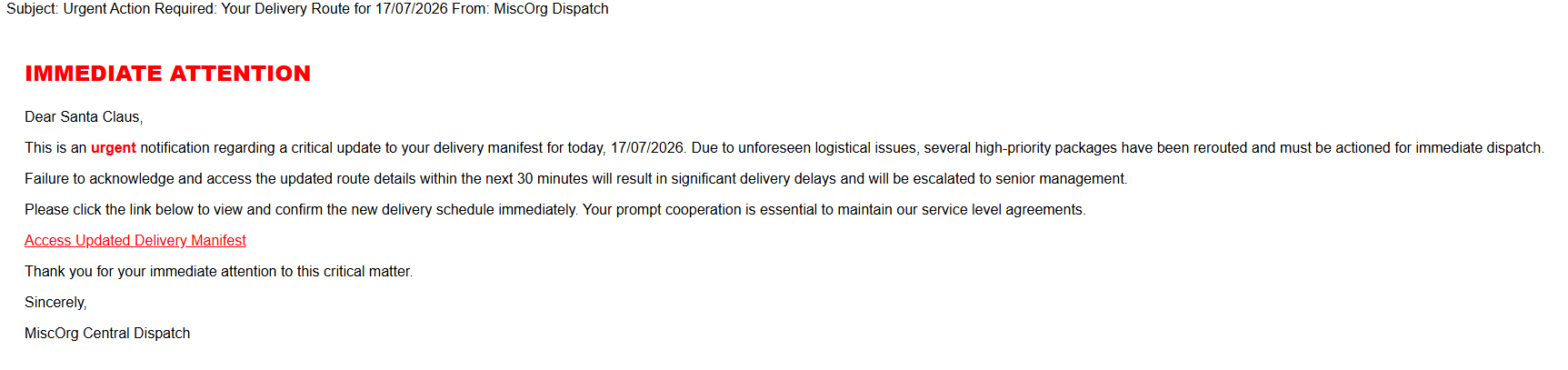
This process is repeated for each user selected, the formatting is dependent on the organisation itself, and its’ colour schemes.
Ada Lovelace’s is tailored to her role as a programmer.
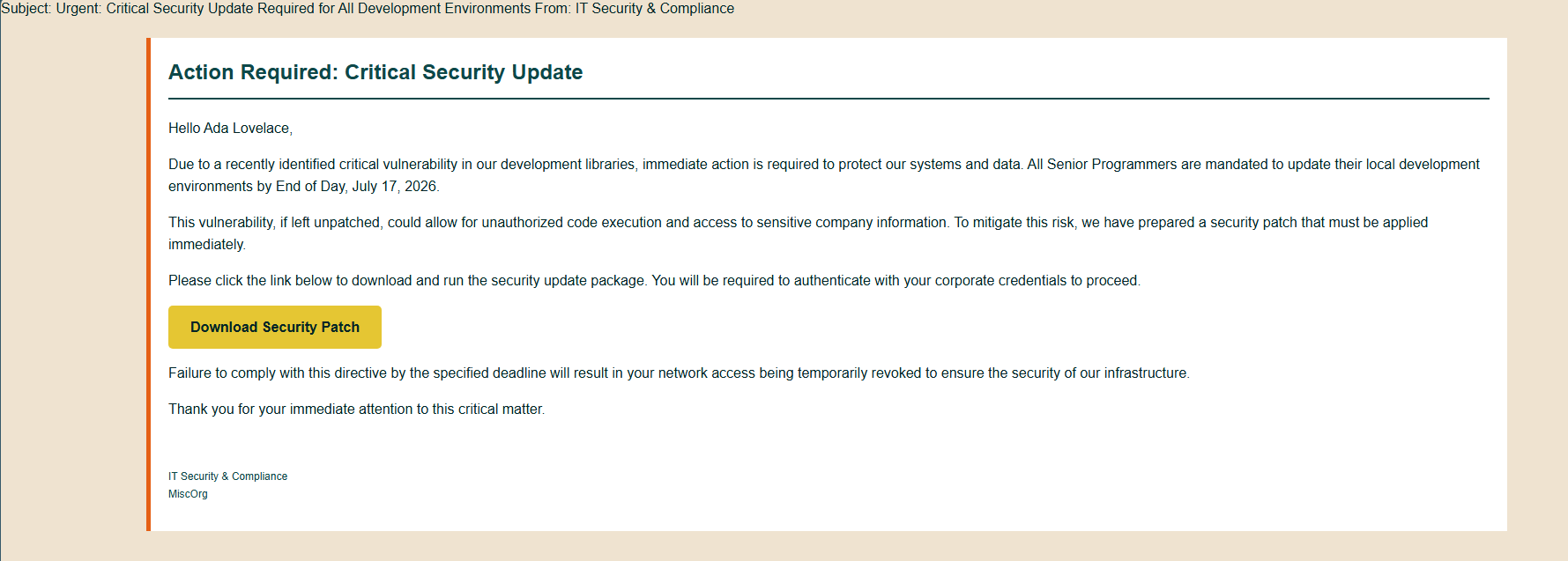
The operator has the choice to accept or reject the email
? Do you approve this email content to be sent to the participant? (Y/n)
Rejecting will prompt a re-generation, and another attempt until the operator rejects three times in a row and that particular user is excluded from the simulation.
Phishing Page Generation
To reduce the number of tokens used, only one website is generated for a given group of users. It follows a similar process to the email generation workflow,
2026-07-17 16:00:15,132 - USER - Simulation status is Generating Website. Generating phishing website for simulation.
2026-07-17 16:00:31,112 - USER - Generated phishing landing page for simulation ID: 992bd4ad-6714-42da-ace3-16650a31c523 and saved to path: SEIBR\simulation_tool\simulation_tool\generated_pages\generated_websites\miscorg_awarded_microsoft_developers_phishing_site.html
2026-07-17 16:00:31,126 - USER - Landing page for simulation ID: 992bd4ad-6714-42da-ace3-16650a31c523 has been generated and saved to: SEIBR\simulation_tool\simulation_tool\generated_pages\generated_websites\miscorg_awarded_microsoft_developers_phishing_site.html
? Would you like to view the landing page in the browser before approving? (Y/n)
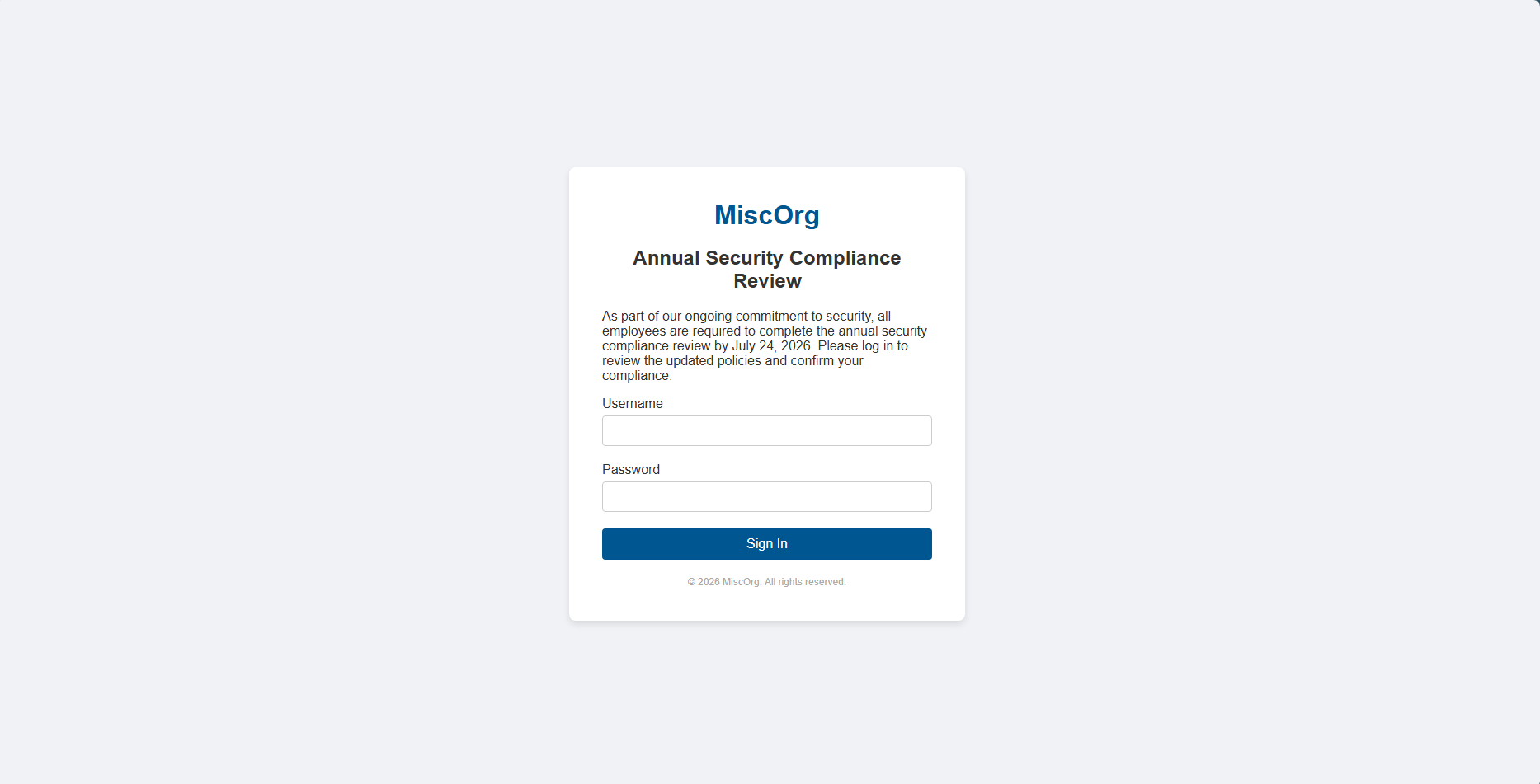
? Do you approve this landing page to be uploaded and used in the simulation? (Y/n)
If the operator agrees, the website is uploaded to Azure, where it can be served.
Email Sending
Each user is then sent an email, each email included an <a> tag with the href=<PHISHING_LINK>. A tracking token is generated for each simulation participant, and then the link is constructed (dependent on the Azure resource), which replaces the <PHISHING_LINK>.
For ease of development, the email used was a standard Gmail account.
The waiting game
Now, dependent on the time set for the simulation length it will be stuck in the AWAITING_INTERACTION phase for some time.
It’s not necessary to keep the script running, as the architecture is such that interactions are updated on Azure, which are then polled each time the script is resumed. Every 30s, the script polls Azure to check for any more interactions.
2026-07-17 16:15:32,630 - USER - Simulation time remaining: 1d 23h 34m 1s
2026-07-17 16:15:32,631 - USER - Simulation ID: 992bd4ad-6714-42da-ace3-16650a31c523 Status:
2026-07-17 16:15:32,631 - USER - Total Participants: 4
2026-07-17 16:15:32,631 - USER - Sent Emails: 3
2026-07-17 16:15:32,631 - USER - Clicked Links: 1
2026-07-17 16:15:32,632 - USER - Submitted Credentials: 0
2026-07-17 16:15:32,632 - USER - ---------------------------------------------------------------------------------
2026-07-17 16:15:32,632 - USER - User: scl***@***.com | Sent Status: 1| Clicked: 1 | Submitted Credentials: 0
2026-07-17 16:15:32,632 - USER - ---------------------------------------------------------------------------------
2026-07-17 16:15:32,633 - USER - User: alo***@***.com | Sent Status: 1| Clicked: 0 | Submitted Credentials: 0
2026-07-17 16:15:32,633 - USER - ---------------------------------------------------------------------------------
2026-07-17 16:15:32,634 - USER - User: ano***@***.com | Sent Status: 1| Clicked: 0 | Submitted Credentials: 0
2026-07-17 16:15:32,634 - USER - ---------------------------------------------------------------------------------
2026-07-17 16:15:32,634 - USER - User: ogl***@***.com | Sent Status: 0| Clicked: 0 | Submitted Credentials: 0
2026-07-17 16:15:32,634 - USER - ---------------------------------------------------------------------------------
Let’s say a user clicks and then enters their credentials
2026-07-17 16:16:47,839 - WARNING - Control+C to stop awaiting interactions and end the simulation early. (you can always resume with --resume-simulation)
2026-07-17 16:16:48,408 - USER - Simulation time remaining: 1d 23h 32m 45s
2026-07-17 16:16:48,408 - USER - Simulation ID: 992bd4ad-6714-42da-ace3-16650a31c523 Status:
2026-07-17 16:16:48,424 - USER - Total Participants: 4
2026-07-17 16:16:48,424 - USER - Sent Emails: 3
2026-07-17 16:16:48,425 - USER - Clicked Links: 1
2026-07-17 16:16:48,425 - USER - Submitted Credentials: 0
2026-07-17 16:16:48,426 - USER - ---------------------------------------------------------------------------------
2026-07-17 16:16:48,426 - USER - User: scl***@***.com | Sent Status: 1| Clicked: 1 | Submitted Credentials: 1
2026-07-17 16:16:48,426 - USER - ---------------------------------------------------------------------------------
2026-07-17 16:16:48,428 - USER - User: alo***@***.com | Sent Status: 1| Clicked: 0 | Submitted Credentials: 0
2026-07-17 16:16:48,428 - USER - ---------------------------------------------------------------------------------
2026-07-17 16:16:48,429 - USER - User: ano***@***.com | Sent Status: 1| Clicked: 0 | Submitted Credentials: 0
2026-07-17 16:16:48,429 - USER - ---------------------------------------------------------------------------------
2026-07-17 16:16:48,430 - USER - User: ogl***@***.com | Sent Status: 0| Clicked: 0 | Submitted Credentials: 0
2026-07-17 16:16:48,430 - USER - ---------------------------------------------------------------------------------
Their credential submission is captured (but not the credentials themselves).
Report Generation
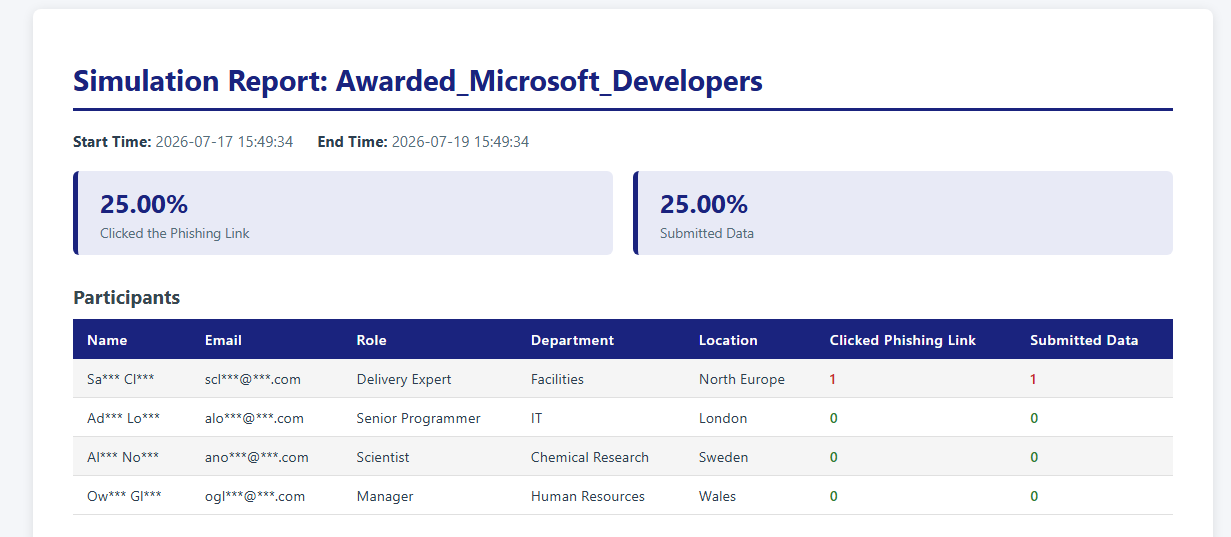
Finally, once all users interact or the simulation timer ends, an HTML report is generated to summarise the findings.